
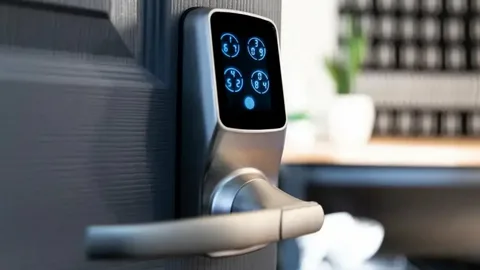
A well-executed smart door lock installation does more than replace a mechanical deadbolt — it transforms how you control access, audit entries, and manage short-term credentials without adding friction to daily life. Done right, smart door lock installation delivers dependable battery life, robust wireless connectivity, clear credential lifecycle controls, and simple recovery paths when things go wrong. Done poorly, it becomes a source of lockouts, drained batteries, flaky radio links, and privacy headaches. This article gives you the full, practical playbook: planning, mechanical reinforcement, power choices, network & security best practices, user workflows, testing scenarios, maintenance schedules, troubleshooting, and contract items to insist on from any pro you hire.
Why planning is the single most important part of any smart door lock installation
Many people think smart door lock installation starts at the bolt selection. The smarter approach starts with outcomes. Ask: who needs access, when, and why? Do you need temporary codes for cleaners, recurring contractor schedules, audit trails for multiple users, or strict auditability for rentals? Defining outcomes shapes which lock technologies, integration strategies, and credential lifecycles make sense. Outcome-driven smart door lock installation prevents feature creep and ensures the final system is judged against real benefits (reduced locksmith calls, fewer rekeys, simpler guest access) instead of gadgetry.
Inspect and fix the mechanical foundation first
A smart lock’s electronics are only useful if the door hardware is mechanically sound. The top causes of failure are weak strikes, short screws, loose hinges, and swollen jambs. Before starting smart door lock installation:
-
Check the door type (solid vs hollow core) and condition of the jamb.
-
Replace short trim screws with 3–4" structural screws into framing where the strike and hinges mount.
-
Install a reinforced strike plate (wrap-around or steel) for doors that see heavy use.
-
If the jamb is rotted, plan a repair or reinforcement kit rather than forcing electronics to compensate.
Mechanical reinforcement reduces bolt binding (which drains battery motors) and raises real security far more than the lock’s digital features.
Choose the right lock architecture for your outcomes
Not all smart locks are created equal. Choose the technology that fits the use-case:
-
Bluetooth-first locks: Good for single-homeowners who want proximity unlock with a phone. They’re simple but often lack remote access and enterprise-grade audit logs.
-
Wi-Fi locks: Offer direct remote access and notifications without an additional hub, but they typically use more battery and require secure Wi-Fi practices.
-
Z-Wave/Zigbee locks (hub-based): Low power, robust mesh networking, and excellent integration with home automation platforms. They require a reliable hub and a well-designed mesh.
-
Wired or PoE readers: Best for multi-tenant or commercial deployments where uptime, centralized credentialing, and auditability matter.
For rentals, property management, or multi-user environments prefer hubbed or cloud-managed access-control-style locks that support role-based credentials and automated expirations.
Power strategy: pick battery, hardwire, or hybrid based on usage
Power reliability underpins any smart door lock installation:
-
Battery-powered locks: Best for retrofits and minimal wiring. Choose lithium-based batteries and ensure the lock provides in-app low-battery alerts and a visible LED local indicator. Document battery replacement cadence (e.g., every 12–18 months under heavy use).
-
Hardwired or low-voltage: Ideal for high-traffic doors (rental turnovers, busy offices). Provide an emergency power terminal for portable jumpers in case of local failures.
-
Hybrid designs: Offer battery backup for brownouts with hardwired primary power.
For heavy-use entries, insist on a hybrid or hardwired approach. Unexpected dead batteries are the most common cause of emergency locksmith calls after smart door lock installation.
Network design and cybersecurity practices that protect access
Treat smart locks as network endpoints. For any smart door lock installation, apply these network hygiene rules:
-
Segment IoT: Place locks and other IoT on a separate VLAN or SSID to limit lateral movement if a device is compromised.
-
Change defaults: Replace default admin credentials on hubs and management portals during commissioning.
-
Two-Factor Authentication: Enable it for cloud management portals and admin accounts.
-
Staged firmware updates: Pilot updates on a few devices, validate, then roll out broadly.
-
Asset register: Maintain a log of MAC addresses, serial numbers, and firmware versions for all locks to simplify audits and updates.
Avoid exposing lock management portals directly to the internet without secure VPNs or enterprise gateways; a local-first control path should be available for critical functions.
Credential lifecycle: plan, name, and expire
Credential management is the operational heart of smart door lock installation success. A few practical rules:
-
Use naming conventions: e.g., Cleaner-YYYYMMDD or Contractor-ACME-0742, so temporary credentials are self-explanatory.
-
Automate expiry for temporary access (guest codes, cleaners) to avoid “forgotten codes” that linger for months.
-
Audit logs: Require the system to log who created each credential and when it was used. For higher security needs, export logs to a secure archive periodically.
-
Role-based access: Provide admin, manager, and user roles with least privilege. Only admins should create revocable service credentials.
When hiring for smart door lock installation, insist the installer demonstrates credential creation and revocation during handover.
Integrations — useful but conservative
Smart locks are most powerful when integrated with cameras, lighting, and automation — but integrations must protect safety:
-
Camera pairing: Snap a still on verified unlocks and store short clips with the entry event for auditability.
-
Lighting: Turn on a porch light for verified night unlocks.
-
Alarm systems: Use multi-sensor confirmation before automatically disarming interior sensors on entry; never rely on a single lock event to disarm life-safety alarms.
Log all automated actions and include the automation trace in the audit trail. Avoid any automation that auto-disables alarms or credentials without multi-factor confirmation.
Commissioning-style testing (without overusing the word) — real scenarios to validate
Before accepting smart door lock installation work, validate the system under real-life and failure scenarios. Key acceptance tests include:
-
Mechanical cycling: Run the lock through hundreds of cycles during acceptance to detect binding.
-
Low-battery simulation: Verify the system alerts and that emergency power options work.
-
Network outage test: Disconnect internet and ensure local unlocking (keypad, key, or hub) still works.
-
Credential validation: Create, use, and revoke temporary codes and verify immediate deactivation.
-
Integration tests: Trigger camera snapshots, lighting responses, and alarm interactions and validate audit logs.
A signed acceptance checklist with signal-strength readings and serial numbers is your best defense if something fails later.
Handover and user training — make it simple and repeatable
A good smart door lock installation ends with human training, not just a software demo. Deliverables to require:
-
A one-page laminated quick guide at the entry (how to add/remove a guest code, emergency power steps).
-
A short admin guide for recovery steps (how to reset a hub, revoke credentials remotely).
-
Two 10–15 minute walkthroughs with different household members or on-site staff.
-
A digital operations binder containing device serials, firmware versions, network SSIDs, and the acceptance checklist.
Users adopt systems faster when they have concise, accessible references.
Maintenance: scheduled tasks that prevent surprises
Set a predictable maintenance cadence:
-
Monthly/quarterly: Check battery percentages, quick visual hardware inspection, clean keypads.
-
Annually: Firmware review, tighten strike and hinge fasteners, test low-battery behavior.
-
Every 2–3 years: Replace batteries proactively if usage is high; refresh credential audit exports for long-term records.
Consider a managed plan for multi-unit properties so one provider stages updates, monitors alarms, and replaces parts on schedule.
Troubleshooting common failure modes and quick fixes
-
Intermittent unlocks: Test radio signal at the mounted lock location — add a repeater or move the hub.
-
Rapid battery drain: Check cycle counts, log frequency of remote unlock events, and look for misconfigured polling intervals or noisy RF environments.
-
Bolt binding: Inspect strike alignment and door movement across seasons — correct jamb or strike rather than blaming electronics.
-
Cloud sync loss: Verify hub health and local fallback behavior; ensure the hub or controller is not power-cycled frequently.
Start with log analysis and the acceptance baseline — it’s faster and more accurate than random parts replacement.
Legal and privacy considerations
If your smart door lock installation logs video or personal entry data, publish a clear policy: who can access logs, how long footage is retained, and how to request exports or deletions. For multi-tenant or commercial deployments, check local laws on recording and privacy and present consent mechanisms where required. Transparency reduces disputes and builds trust.
How to evaluate quotes — insist on engineering, not just price
When comparing installers for smart door lock installation, normalize quotes by deliverables:
-
Site survey and photos of the door and jamb.
-
Mechanical reinforcement scope (if needed).
-
Exact part numbers for locks, batteries, hubs.
-
Network segmentation plan and hub location.
-
Acceptance checklist and a signed handover.
-
Training and documentation.
-
Maintenance or managed-service options.
Cheaper bids that omit acceptance testing or mechanical reinforcement will cost more in callbacks. Require a fixed-price scope with change-order rules.
Practical homeowner checklist (before and after install)
Before: measure door thickness/backset, photograph the strike and hinge, make a short list of who needs access and for how long.
After: save the acceptance report, store a spare battery pack, encode a simple naming convention for credentials, and set a calendar reminder for annual firmware and hardware checks.
Final thoughts
Smart door lock installation is a systems job — mechanical, electrical, network, and operational. When you plan for outcomes, reinforce the door, choose the right power strategy, segregate and secure the network, design credential lifecycles, demand robust acceptance testing, and provide clear user handover, the smart lock becomes a reliable, privacy-respecting layer that reduces friction rather than adding it. Do those things and you’ll replace locksmith headaches with confidence and convenience.

 English
 Arabic
 French
 Portuguese
 Deutsch
 Turkish
 Dutch
Dutch
 Italiano
 Russian
 Romaian
 Portuguese (Brazil)
 Greek
Greek